> For the complete documentation index, see [llms.txt](https://docs.mikopbx.com/mikopbx/llms.txt). Markdown versions of documentation pages are available by appending `.md` to page URLs; this page is available as [Markdown](https://docs.mikopbx.com/mikopbx/english/modules/miko/module-a-i-supervisor.md).
# Local AI Supervisor
Local AI analysis of MikoPBX call transcripts: summary, call outcome, risks, tone, and employee performance scoring. The analysis runs on a Mac within your infrastructure.
**Local AI Supervisor** helps supervisors keep track of how phone conversations go. The module takes completed call transcripts and uses a local language model to review each call: it writes a short and a detailed summary, identifies the contact reason, the outcome and the next step, highlights topics and risks, evaluates the communication tone and scores how well the employee handled the call. Calls that need a supervisor's attention are collected in a separate list, so you do not have to look for them manually.
{% hint style="info" %}
The module does not run a language model inside MikoPBX. The analysis is performed by a separate **AI Supervisor Worker** application on an Apple silicon Mac. It uses the local Ollama runtime, so transcripts and analysis results never leave your infrastructure. See [AI Supervisor Worker](/mikopbx/english/modules/miko/module-a-i-supervisor/miko-ai-worker.md) for details about the application.
{% endhint %}
SCREENSHOT: The module's "Overview" tab - general view of the home page
### How it works
1. A transcription module transcribes a recorded call.
2. Local AI Supervisor imports the completed transcript and creates an analysis job.
3. AI Supervisor Worker on the Mac picks up the job and receives the transcript and the call recording.
4. The local model reviews the conversation. Long calls are processed in parts, and intermediate results are saved, so a retry does not start from scratch.
5. The worker sends the result to MikoPBX. The module validates it: every quote must match a line of the transcript, otherwise the finding is not counted.
6. The review appears on the **Overview** and **Calls** tabs.
### Transcript sources
The module does not recognize speech itself - it analyzes transcripts created by one of the MikoPBX transcription modules:
| Source | Where speech is recognized | Minimum version |
| ------------------------------------------------------------------------------------ | ------------------------------------------ | --------------- |
| [Local Transcription](/mikopbx/english/modules/miko/module-local-speech-to-text.md) | Locally, on a Mac running Local STT Worker | 1.102 |
| [Cloud Speech-to-Text](/mikopbx/english/modules/miko/module-cloud-speech-to-text.md) | In the MIKO cloud service | 1.75 |
The module works with one source at a time. The source is selected in the setup wizard and can be changed later in [**Settings** → **Transcript source**](#transcript-source).
### Requirements and compatibility
* MikoPBX **2025.1.1** or later.
* An installed and enabled transcription module: **Local Transcription** 1.102+ or **Cloud Speech-to-Text** 1.75+.
* An Apple silicon Mac with macOS 14 or later for **AI Supervisor Worker** version **1.78** or later.
* Network access from the Mac to the MikoPBX web interface.
* Internet access on the Mac for the initial installation of Ollama and the model download.
{% hint style="warning" %}
Only AI Supervisor Worker 1.78 and later can calculate call quality scores. With an older version, calls are still analyzed but receive no quality score, and the **Overview** tab shows **Update the worker for the module to work correctly**. When upgrading, update the Mac application first, then the module.
{% endhint %}
### Installing the module
1. Open the MikoPBX web interface.
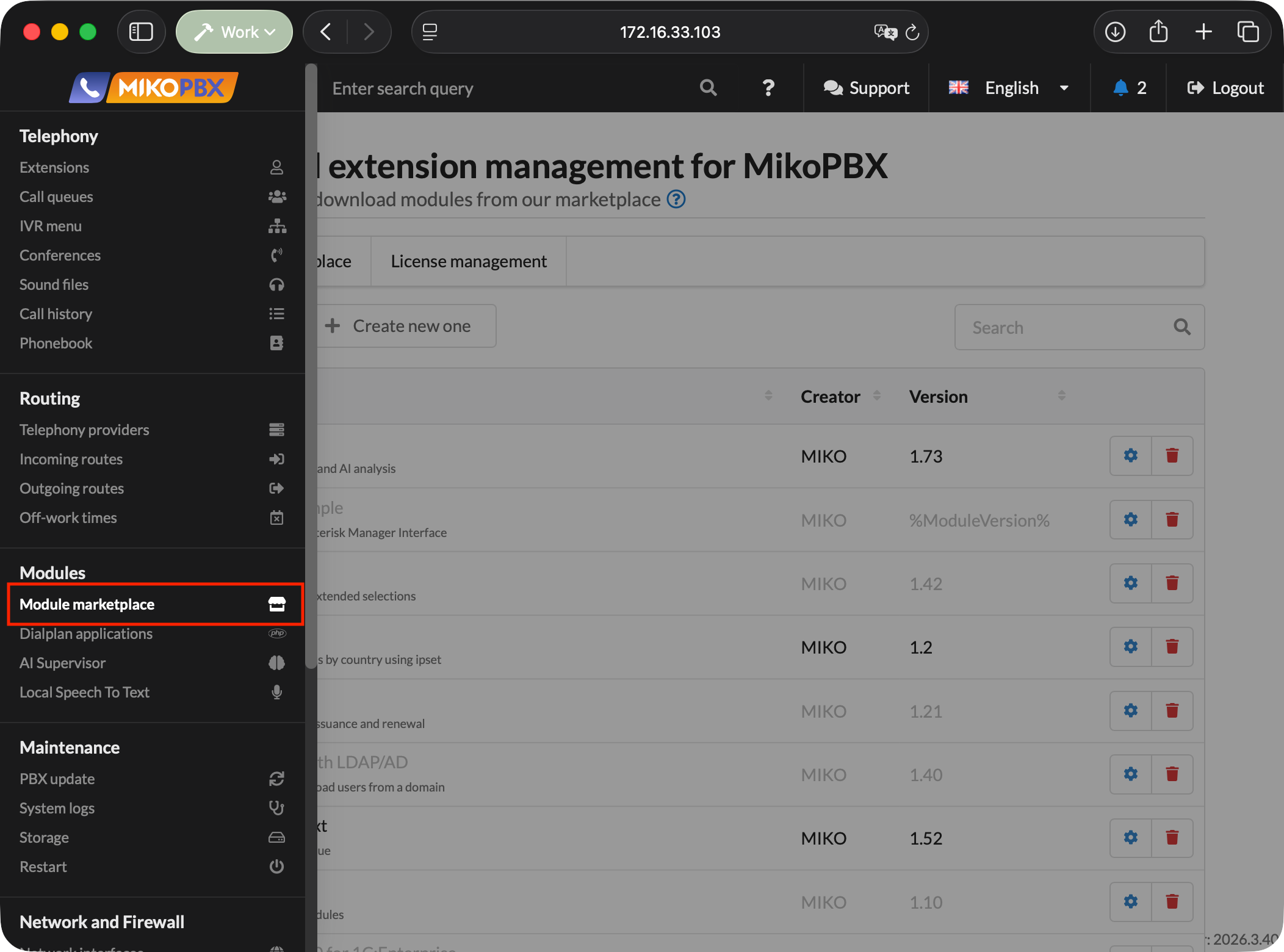
2. Go to **Modules** → **Module Marketplace**.
The "Module Marketplace" section
3. Find the **Local AI Supervisor** module and install it.
4. Open the list of installed modules and enable the module.
5. Click the settings button to the right of the module version.
SCREENSHOT: The "Installed modules" section - enabling "Local AI Supervisor" and the button that opens its settings
### Setup wizard
When you open the module for the first time, a two-step setup wizard starts. Calls are not imported or analyzed until the wizard is finished.
{% hint style="info" %}
Only users allowed to manage the module settings see the wizard. Until setup is finished, other users see the **Local AI Supervisor is not set up yet** message.
{% endhint %}
#### Step 1. Transcript source
Select the module that will provide transcripts. For each source, the wizard shows whether the module is installed and enabled and which version it has. Only a source in the **Ready** state can be selected. If there is no suitable module, install and enable a transcription module, then click **Check again**.
Below, choose **from which moment calls are analyzed**:
| Option | What is analyzed |
| ---------------- | ------------------------------------------------- |
| **From now** | Only new calls made after the wizard is finished. |
| **Last day** | Calls from the last 24 hours and all new calls. |
| **Last 7 days** | Calls from the last week and all new calls. |
| **Last 30 days** | Calls from the last month and all new calls. |
Calls that started before the selected moment are still listed but are not analyzed. They are marked as **Before source start**.
Click **Next**.
SCREENSHOT: Setup wizard - step 1 "Transcript source" with the source and the analysis window
#### Step 2. Local worker
This step connects the application that performs the analysis:
1. **Install the worker on a Mac** - click **Download worker** and install AI Supervisor Worker from the downloaded `.dmg`.
2. **Create a key and paste it into the worker** - click **Generate API key** and copy the key. It is shown only once.
3. **Worker connection** - open the application on the Mac, enter the MikoPBX address and the key, then start the worker. Configuring the application is described in detail in [Quick Start](/mikopbx/english/modules/miko/module-a-i-supervisor/quick-start.md#setting-up-ai-supervisor-worker).
As soon as the worker connects, the status changes to **Connected and online**, and the **Finish setup** button becomes available.
If the Mac is not ready yet, click **Skip, I will connect it later**. Call import starts right away, and analysis starts once a worker is connected in **Settings** → **Workers**.
SCREENSHOT: Setup wizard - step 2 "Local worker" with the connection status
When finished, the wizard shows the result: **Analysis is running** if a worker is connected, or **Import is running** if the worker step was skipped. The first results appear on the **Overview** tab within a few minutes.
{% hint style="info" %}
When you upgrade the module from a version that had no wizard, the wizard is not shown: the module keeps the previous settings, continues to work with the Local Transcription module and resumes import from the same position.
{% endhint %}
### "Overview" tab
The tab opens by default and shows the picture for the selected period: **1 day**, **7 days**, **30 days**, or **Custom period**.
SCREENSHOT: The "Overview" tab - the "Needs your attention" block, metric cards and charts
At the top is the **Needs your attention** block - the number of analyzed calls that should be checked and have not been processed yet. The **Show calls** button opens their list. Next to it, the **AI summary** briefly describes the most noticeable problem and the recurring pattern for the period.
Below are the metrics:
| Metric | What it shows |
| -------------------------- | ---------------------------------------------------------------------------------- |
| **Calls with transcripts** | How many calls with a completed transcript were imported during the period. |
| **AI reviews** | How many calls have been analyzed, how many are waiting and how many were skipped. |
| **Avg. call duration** | The average call duration for the period. |
| **Avg. quality** | The average call quality score on a 0–100 scale. |
| **Negative calls** | The number of calls with a negative tone, compared with the previous period. |
Below the metrics are the **Calls over time**, **Calls by employee**, **Call direction** and **Communication tone** charts, as well as the **Top problems**, **Attention flags**, **Top call topics** and **Negative drivers** rankings.
Every metric, chart bar and ranking row is clickable: the module opens the **Calls** tab with the corresponding filter already applied.
### "Calls" tab
This is the supervisor's main workspace: all imported calls and their analysis results are collected here.
SCREENSHOT: The "Calls" tab - the call list with filters
#### Search and filters
The search box looks up phone numbers, employees, topics and call IDs. Next to it, select the period and use the filters:
| Filter | Values |
| --------------- | ----------------------------------------------------------------------------------------- |
| **Completion** | Open or closed calls. |
| **Workflow** | New, in progress, or processed. |
| **AI analysis** | In progress, complete, incomplete, waiting for speech recognition, not started, disabled. |
| **Overdue** | Calls with an overdue workflow deadline. |
The **More filters** button opens additional filters: direction or number, employee, tone, quality (high, medium, low), risk (high, medium, low) and workflow deadline.
The list can be sorted by **Newest first**, **Oldest first**, **Highest risk**, **Lowest quality first**, or **Longest calls**.
#### Call list
Each call row shows the time, the customer, the employee, the contact reason or topic, the quality score, the attention reasons and the duration.
* If the call was transferred and several employees talked to the customer, the quality column shows the average score with a marker such as **2 empl.** Hover over it to see each employee's score.
* Escalated calls are highlighted in light blue.
* Calls made before the transcript source was connected are marked as **Before source start** and are not analyzed.
Clicking a row expands a short review right in the list. To open the full card, click **Open call card**.
A call gets into the **Needs your attention** list for one or more reasons:
| Reason | When it applies |
| ---------------------------------- | ----------------------------------------------------------- |
| **High risk score** | The AI rated the call risk as high. |
| **Low employee performance** | The quality score is below the threshold. |
| **Negative customer sentiment** | The customer spoke in a negative tone. |
| **Customer left with the problem** | It is confirmed that the customer's issue was not resolved. |
| **AI flags detected** | The AI flagged problems or warnings in the conversation. |
Attention rules and the risk and topic dictionaries work automatically and need no configuration. A call no longer needs attention once its workflow is marked as **Processed**.
#### Bulk actions
Select several calls with the checkboxes to apply an action to all of them at once: **Take in work**, **Mark processed**, or **Return to new**.
#### Call card
The card brings together everything known about the call.
SCREENSHOT: Call card - the header with participants, quality score and attention reasons
The card header shows the call participants, direction, date, duration and call quality score. If the call needs attention, the **Attention reasons** are listed below.
The **Call analysis** block contains:
* the **Call summary** and a detailed summary;
* the **Contact reason**, the **Outcome** with its status (resolved, partly resolved, transferred, awaiting action, not resolved) and the **Next step**;
* the conversation **Topics**;
* **Evidence** - transcript quotes that the AI findings are based on;
* risk, communication tone and complexity indicators.
Next to it is the detailed **quality assessment** by criteria groups, described in [Call quality assessment](#call-quality-assessment).
SCREENSHOT: Call card - the "Call analysis" block and the quality assessment
Below is the **transcript** with a built-in player: clicking a line moves playback to that moment, and playback speeds of 1x, 1.5x and 2x are available. Employee lines are labeled with the employee's name. If the employee consulted a colleague during the call, the transcript is split into the **Customer conversation** and **Internal consultation** tabs. The AI analyzes only the conversation with the customer.
On the right is the **Case workflow** panel:
* **Workflow status** - **New**, **In progress**, or **Processed**;
* **Escalation** - marks that the call requires a supervisor's attention;
* **Notes** - comments about what happened and what to do next. All notes are kept in the **Note history**.
Changes in the panel are saved automatically.
SCREENSHOT: Call card - the transcript with the player and the "Case workflow" panel
### Call quality assessment
The module scores the employee's work on a scale from 0 to 100. The AI finds facts for each criterion in the conversation and backs them with quotes, and the module validates the quotes and calculates the final score using a single methodology.
The criteria are grouped into six groups:
| Group | What is checked |
| ----------------------------- | ------------------------------------------------------------------------------------------------------- |
| **Understanding the request** | The request is understood, missing details are clarified, key details are confirmed. |
| **Appropriate actions** | Actions address the request, the information is supported, the employee takes ownership of the request. |
| **Script compliance** | Requirements of the [script](#scripts) assigned to the employee, if any. |
| **Communication** | Respectful communication, clear explanation, listening and checking understanding. |
| **Conversation management** | The conversation is kept on track, waiting and transfers are explained. |
| **Closure and next step** | The next step is agreed, the timeframe is agreed, the result is checked. |
The score falls into one of three zones:
| Zone | Score |
| ---------- | ------------ |
| **Low** | below 50 |
| **Medium** | 50–79 |
| **High** | 80 and above |
Hover over the score to see how many criteria could be checked and the result for each group. The call card also shows the **What went well** and **What to improve** blocks with recommendations for the employee.
A few rules worth knowing:
* If the call does not contain enough confirmed data, no score is given - the call is marked as **Not assessed**.
* If only some of the criteria are confirmed, the score is marked as **Partial assessment** and counts with a lower weight in averages.
* If the customer was left with an unresolved problem and no next step was agreed, the score does not exceed 79.
* A confirmed failure of a critical script requirement limits the score to 49.
* If the call was transferred, each employee is scored separately for their own part of the conversation and against their own script. The call score is the average of the employees that could be scored. The card shows an **Average** tab and tabs with employee names: each one contains the employee's score, their part of the conversation, the handoff reason, the outcome and key quotes.
{% hint style="info" %}
Calls analyzed before the switch to the current methodology are shown as **Not assessed** until they are analyzed again. Their previous score is available in the collapsed **Previous assessment** block.
{% endhint %}
### "Settings" tab
Settings are split into sections in the side menu. Changes are saved automatically - there is no separate save button.
#### Workers
The section for connecting AI Supervisor Worker:
* **Worker application** - the **Download worker** button downloads the latest version of the macOS application.
* **Access key** - the **Generate API key** button creates a new key. The full key is shown only once, so copy it right away.
* **Active API keys** - the list of keys with the creation date, last use time and number of bound workers. A key that is no longer needed can be deleted.
* **Connected workers** - registered Macs with their IP address, status and last activity time.
{% hint style="info" %}
Create a separate key for each Mac: one key cannot be bound to several workers.
{% endhint %}
SCREENSHOT: Settings → "Workers"
#### Call flow
| Setting | Default | Purpose |
| ----------------------------------------- | ----------------------------- | ------------------------------------------------------------------------------------------------------------------------------------ |
| **Analyze new transcripts automatically** | Enabled | New transcripts are queued for analysis right away. |
| **Process internal calls** | Disabled | When disabled, calls between employees stay in the list but are not analyzed. |
| **AI result language** | Same as each call - automatic | Language of summaries and recommendations: the call language, Russian, or English. The transcript always stays in the call language. |
| **Data retention** | Forever | How long transcripts and analysis results are kept: 3 months, 6 months, 1 year, 2 years, or forever. |
{% hint style="warning" %}
With a limited retention period, transcripts, AI results and related data older than the selected period are deleted automatically once a day. This cannot be undone. Call recordings and the MikoPBX call history are not affected.
{% endhint %}
SCREENSHOT: Settings → "Call flow"
#### Transcript source
This section shows which transcription module is currently used, its state and from which moment calls are analyzed.
To switch the source:
1. In the **Switch source** block, select another transcription module.
2. Choose from which moment calls of the new source are analyzed.
3. Click **Switch to ...**.
Calls that have already been analyzed are kept. If you switch back to the previous source later, import resumes where it stopped.
For Cloud Speech-to-Text, the module creates a service access key automatically. If the cloud module rejects the key, new calls stop being imported and the module shows a warning. In this case, click **Re-create the access key**.
SCREENSHOT: Settings → "Transcript source"
#### AI analysis
**Analysis components** define which stages the worker performs for each new call. The main call review - summary, outcome, risks, topics and quality score - always runs when automatic analysis is enabled. You can additionally enable:
| Component | Default | Purpose |
| --------------------- | -------- | --------------------------------------------------------------------------------------------------- |
| **Voice metrics** | Enabled | Speech pace, interruptions, pauses and the balance between participants. |
| **Text emotion** | Disabled | The local model estimates participants' emotions from transcript fragments. Requires voice metrics. |
| **Acoustic analysis** | Disabled | Adds acoustic features of the recording to the voice metrics. Requires voice metrics. |
In the model selection block, choose the model profile. The selected model is passed to the worker, which downloads it to the Mac on its own.
| Profile | Model | Memory | When to choose |
| ----------------- | ------------ | ------- | --------------------------------------------------------------------------------------------------- |
| **Qwen3.5 4B Q4** | `qwen3.5:4b` | 4–6 GB | Recommended. Fast everyday call analysis that leaves memory for speech recognition on the same Mac. |
| **Qwen3.5 9B Q4** | `qwen3.5:9b` | 8–12 GB | Long and complex calls. Up to 2 times slower and needs about 9 GB of free memory. |
The collapsed **Expert runtime settings** block contains:
| Setting | Options | Purpose |
| ------------------------ | ------------------------------------- | --------------------------------------------------------------------------------- |
| **Keep model in memory** | Unload, 5 min, 15 min, Always | How long Ollama keeps the model loaded after a request. The default is 5 minutes. |
| **Waiting time** | Normal, Long, Very long (300–600 sec) | How long the worker waits for the model's response to a single request. |
| **Retries** | Low, Medium, High (2–5 attempts) | How many times a job is retried after temporary failures on the Mac. |
{% hint style="info" %}
Expert settings affect queue stability. The defaults suit most stations. When you switch the model, the waiting time and the number of retries adjust to it automatically unless you changed them manually.
{% endhint %}
SCREENSHOT: Settings → "AI analysis"
#### Scripts
A script is a set of conversation requirements used to additionally score an employee. For example, for outbound calls you can require the employee to introduce themselves, state the purpose of the call and ask whether it is convenient for the customer to talk.
To create a script:
1. Click **New script** or select **Template: outbound call**.
2. Enter the **Name** and **Description**.
3. Add **Requirements**. For each requirement, set:
* the requirement text;
* **When it applies** - a condition, for example "when a follow-up call is needed";
* **Importance** - normal, important, or critical;
* **Replaces a standard criterion** - use it instead of one of the standard scoring criteria or keep it as an independent requirement;
* **Check** - the meaning of what was said or a required phrase, word for word.
4. Click **Save script**.
Then, in the **Employee assignments** block, select an employee (or **All employees**), a script and the call type - **All directions**, incoming, outgoing, or internal - and click **Assign**. An employee can have only one script per call type.
{% hint style="info" %}
Script changes apply only to new assessments. Calls scored earlier keep the rules they were checked against.
{% endhint %}
SCREENSHOT: Settings → "Scripts" - editing a script and employee assignments
#### System
The section has two tabs.
**Processing** - the state of the analysis queue:
| Counter | What it means |
| ---------------- | ------------------------------------------------------------------------------ |
| **New calls** | Transcripts that have no AI review yet. |
| **Pending** | Jobs are ready and waiting for a worker on the Mac. |
| **In progress** | A worker is processing the job. |
| **Needs action** | Errors and jobs waiting for a retry. |
| **Done** | Saved AI reviews. |
| **Skipped** | Empty or low-information transcripts and calls made before the source started. |
In the **Recovery actions** block, you can **Retry failed jobs**, **Return stalled jobs** to the queue, and **Clear queue** - delete unfinished and failed jobs. Completed reviews are kept when the queue is cleared. Below is the job list with the **Active**, **Errors**, **Done**, **Skipped** and **All** filters: for each job, you can open the call or repeat the analysis.
SCREENSHOT: Settings → "System" → "Processing"
**Diagnostics** - the module log and the diagnostic file. The log contains technical events of the module and the workers and can be filtered by level, component and text. The **Download diagnostics** button creates an anonymized file for technical support: it contains no transcripts, analysis results, keys, or call recordings.
SCREENSHOT: Settings → "System" → "Diagnostics"
### Access rights
When the [Access control management](/mikopbx/english/modules/miko/module-users-u-i.md) module is used, Local AI Supervisor provides separate permissions:
| Permission | What it opens |
| ------------------------------------------------- | ------------------------------------------------------------------------------------------- |
| **View calls and statistics** | The **Overview** and **Calls** tabs, the call card and the case workflow. |
| **Manage module settings** | The **Call flow**, **Transcript source** and **AI analysis** sections and the setup wizard. |
| **Connect workers and manage the queue and logs** | The **Workers**, **Scripts** and **System** sections. |
### REST API
The module provides a REST API for integrations. Base path:
```
/pbxcore/api/v3/module-ai-supervisor
```
| Purpose | Endpoint |
| --------------------------------- | -------------------------------------------------------------------- |
| Module health | `GET /health` |
| "Overview" tab data | `GET /dashboard` |
| Call list, call card and workflow | `GET /calls`, `GET /calls/{id}`, `PATCH /calls`, `PATCH /calls/{id}` |
| Settings | `GET/PATCH /settings` |
| Setup wizard | `GET/PATCH /onboarding` |
| Transcript sources | `GET/POST /sources` |
| Scripts and their assignments | `/quality-scripts`, `/quality-script-assignments` |
| Job queue | `GET/POST/PATCH/DELETE /jobs` |
| Transcript import | `POST /imports`, `GET /imports/{id}` |
| Worker access keys | `GET/POST /worker-api-keys`, `DELETE /worker-api-keys/{id}` |
| Registered workers | `/workers` |
| Log and diagnostics | `GET /logs`, `GET /diagnostic-reports` |
The `/worker-api-contract`, `/job-leases`, `/job-recordings`, `/job-results`, `/job-partials`, `/job-failures` and `/job-voice-analytics` resources are used by AI Supervisor Worker to receive and process jobs. They are not intended for external integrations.
### Troubleshooting
**The module says it is not set up**
* A user allowed to manage the module settings must open the module and complete the [setup wizard](#setup-wizard).
**The "Calls" tab is empty**
* Open **Settings** → **Transcript source** and check that the source is in the **Ready** state.
* Make sure the transcription module has completed transcripts.
* Calls made before the moment selected in the wizard are not analyzed - this is expected behavior.
**Calls are imported but not analyzed**
* Open **Settings** → **Workers** and check that at least one worker is online.
* Check that automatic analysis is enabled in **Call flow**, and for calls between employees - that internal call processing is enabled.
* Open **Settings** → **System** → **Processing**: if there are jobs in **Needs action**, check the worker and click **Retry failed jobs**.
* The **Waiting for speech recognition** status means the module is waiting for a transcript from the source. This is not an error: the job is not handed to a worker and does not use up attempts.
**The "Cloud Speech To Text rejected the access key" message appears**
* Open **Settings** → **Transcript source** and click **Re-create the access key**.
**New calls have no quality score**
* Update AI Supervisor Worker to version 1.78 or later.
* If the call card says **Not assessed**, the conversation does not contain enough confirmed data for a score - for example, the call is too short.
**The worker does not connect**
* Make sure you are using a key from the **Workers** section of Local AI Supervisor, not a Local STT Worker key.
* Check the MikoPBX address, the TLS certificate and that the web interface is reachable from the Mac.
* Open the **Diagnostics** section in the application and run a connection check. See [AI Supervisor Worker](/mikopbx/english/modules/miko/module-a-i-supervisor/miko-ai-worker.md) for details.
---
# Agent Instructions
This documentation is published with GitBook. GitBook is the documentation platform designed so that both humans and AI agents can read, navigate, and reason over technical content effectively. Learn more at gitbook.com.
## Querying This Documentation
If you need additional information that is not directly available in this page, you can query the documentation by asking a question.
Perform an HTTP GET request on the following URL with the `ask` and `goal` query parameters:
```
GET https://docs.mikopbx.com/mikopbx/english/modules/miko/module-a-i-supervisor.md?ask=&goal=
```
`ask` is the immediate question: it should be specific, self-contained, and written in natural language.
`goal` is what the user is ultimately trying to achieve, the reason they need the answer. Sharing it helps GitBook give you a better, more relevant answer. A goal is most helpful when it describes the outcome the user wants rather than restating the question. For example, with `ask=how do I create an API token`, a goal like `automate deployments from our CI pipeline` lets GitBook tailor the answer to that use case.
The response will contain a direct answer to the question and relevant excerpts and sources from the documentation.
Use this mechanism when the answer is not explicitly present in the current page, you need clarification or additional context, or you want to retrieve related documentation sections.