> For the complete documentation index, see [llms.txt](https://docs.mikopbx.com/mikopbx/llms.txt). Markdown versions of documentation pages are available by appending `.md` to page URLs; this page is available as [Markdown](https://docs.mikopbx.com/mikopbx/english/modules/miko/module-local-speech-to-text/miko-ai-worker.md).
# Local STT Worker
Local STT Worker for macOS: connecting to MikoPBX, local transcription, history, models, diagnostics, settings, and Worker API updates.
**Local STT Worker** is an application that locally recognizes MikoPBX call recordings. It downloads one assigned job, prepares the audio, runs the engine selected in MikoPBX, and sends timestamped segments and technical diagnostics back to the PBX.
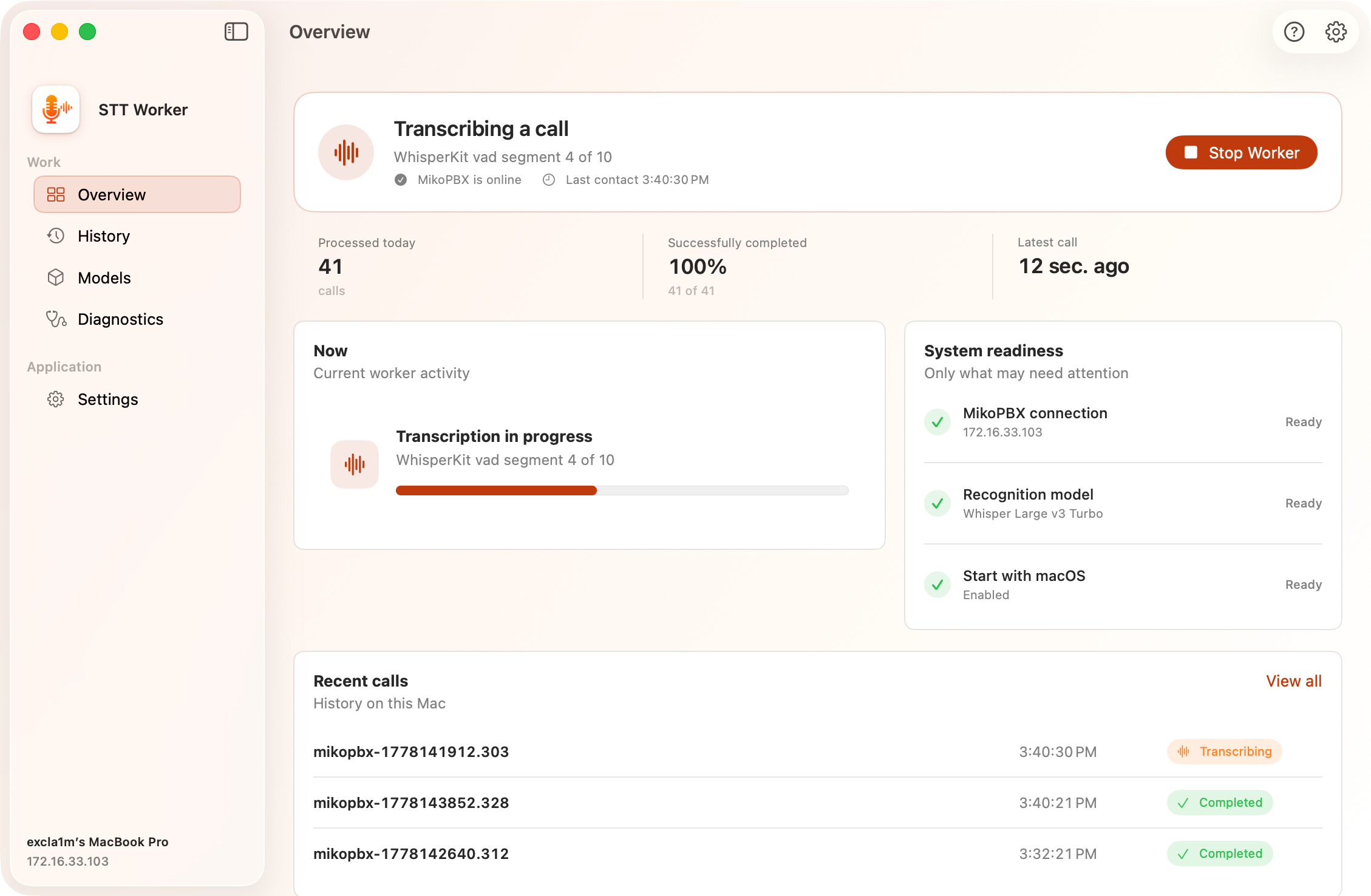
Overview page in Local STT Worker
### Requirements
* A Mac with Apple silicon.
* macOS 14.0 or later.
* MikoPBX 2025.1.1 or later.
* Network access to the PBX.
* Internet access for the first download of the selected model and its supporting files.
### Models
The model is selected in MikoPBX: **Modules** → **Local Transcription** → the **Model marketplace** tab, platform **macOS (Apple Silicon)**. The worker downloads the model with the first job and keeps it locally (see the Models section of the application below). The models run on Core ML with Apple hardware acceleration.
{% hint style="warning" %}
Parakeet supports 25 languages: Bulgarian, Croatian, Czech, Danish, Dutch, English, Estonian, Finnish, French, German, Greek, Hungarian, Italian, Latvian, Lithuanian, Maltese, Polish, Portuguese, Romanian, Slovak, Slovenian, Spanish, Swedish, Russian, and Ukrainian. For another language, select a WhisperKit model or change the model before processing such calls.
{% endhint %}
| Model | When to choose it | Characteristics |
| -------------------------- | --------------------------------------- | ------------------------------------------------------------------------------------------------ |
| **Parakeet TDT 0.6B v3** | Most calls | Default model. Fast recognition of long-form speech in 25 languages through the Parakeet engine. |
| **Whisper Large V3 Turbo** | You want a proven general-purpose model | A good balance of speed and quality for typical multilingual calls through WhisperKit. |
| **Whisper Podlodka Turbo** | Almost all conversations are in Russian | A Whisper model fine-tuned for Russian speech from `smkrv/whisper-podlodka-turbo-coreml`. |
| **Whisper Large V3** | Quality matters more than speed | The heaviest model in the catalog for difficult or unclear recordings. Runs through WhisperKit. |
### First launch
{% hint style="info" %}
The onboarding process is described in detail in the [Quick Start guide](https://docs.mikopbx.com/mikopbx/english/modules/miko/module-local-speech-to-text/pages/fdaDSLKamgHoqtQzWBei#step-1.-language).
{% endhint %}
The onboarding wizard has three steps:
1. **Choose your language** — select the English or Russian interface. After changing the language, the application may prompt you to restart and will continue setup when it opens again.
2. **Connect to MikoPBX** — enter the `https://...` address, worker name, and token from the **Workers** tab. Advanced settings contain TLS verification, a custom CA, and the worker UID.
3. **Ready to use** — verify MikoPBX and Speech to Text readiness, configure launch at login, and open the application.
### Navigation
| Section | Purpose |
| --------------- | -------------------------------------------------------------------------------- |
| **Overview** | Worker status, connection, current activity, system readiness, and recent calls. |
| **History** | Local history of jobs handled by this Mac, with filters and search. |
| **Models** | Locally downloaded WhisperKit and Parakeet Core ML models and storage usage. |
| **Diagnostics** | Connection check, UID, heartbeat, and local events. |
| **Settings** | MikoPBX connection and settings that apply only to this Mac. |
### Overview section
The top panel displays one of the main states:
| State | Meaning |
| ------------------------- | ---------------------------------------------------------- |
| **Everything is working** | The worker is connected and automatically polls the queue. |
| **Transcribing a call** | A job is currently being processed. |
| **Attention required** | A connection, compatibility, or processing error occurred. |
| **Ready to start** | The connection is configured, but the worker is stopped. |
| **Setup required** | The PBX address, token, or registration is missing. |
The primary button changes with the state: **Start Worker**, **Stop Worker**, or **Open Settings**. When the worker is stopped, new calls remain in the MikoPBX queue.
The summary shows the number of calls processed today, the percentage of successfully completed jobs, and the time of the latest call. Below it are the current activity, connection readiness, selected model, launch-at-login status, and three most recent jobs. The selected model name comes from the centralized MikoPBX settings; the worker interface has no separate local default-model selection.
During active processing, the current stage and progress are displayed:
1. contract check and registration;
2. job lease acquisition;
3. recording download;
4. audio analysis and preparation;
5. engine selection and model download or loading;
6. local transcription through Parakeet or WhisperKit;
7. result or failure submission;
8. temporary file cleanup.
Before submitting a result, the worker normalizes it and rejects empty, corrupted, and clearly repetitive fragments. Technical diagnostics include accepted and rejected segment counts and rejection reasons; the module then applies its additional server-side quality filter.
### History section
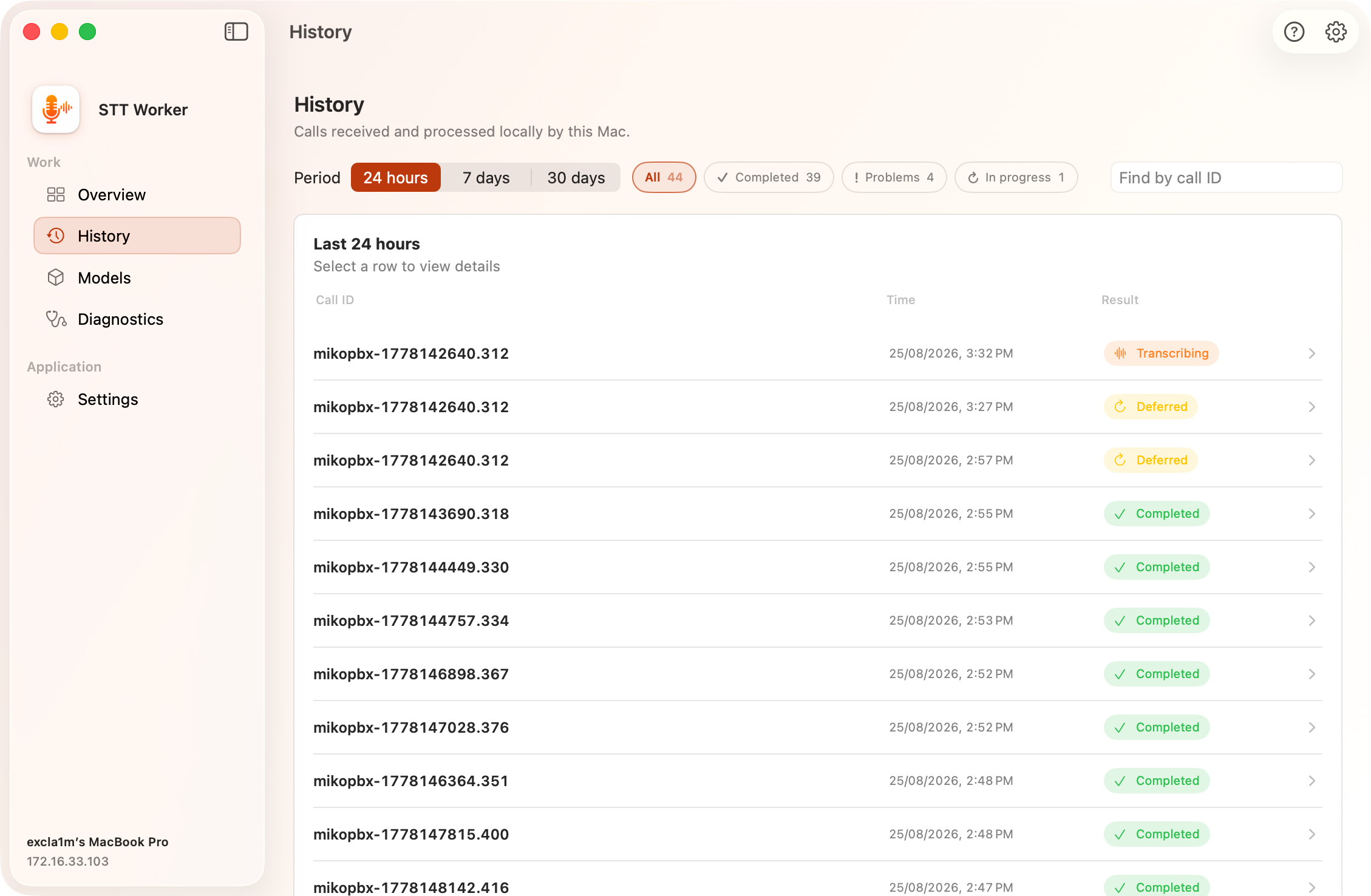
History contains only the jobs received by this Mac. It is not the complete PBX transcript list.
Available periods are **24 hours**, **7 days**, and **30 days**. You can filter completed, problematic, and active jobs, or search by `call_id`. Expand a row to view its stages and technical data. A problematic job includes a shortcut to **Diagnostics**.
Local history is retained between application launches. Completed transcripts and call recordings continue to be stored and managed by MikoPBX.
History in Local STT Worker
### Models section
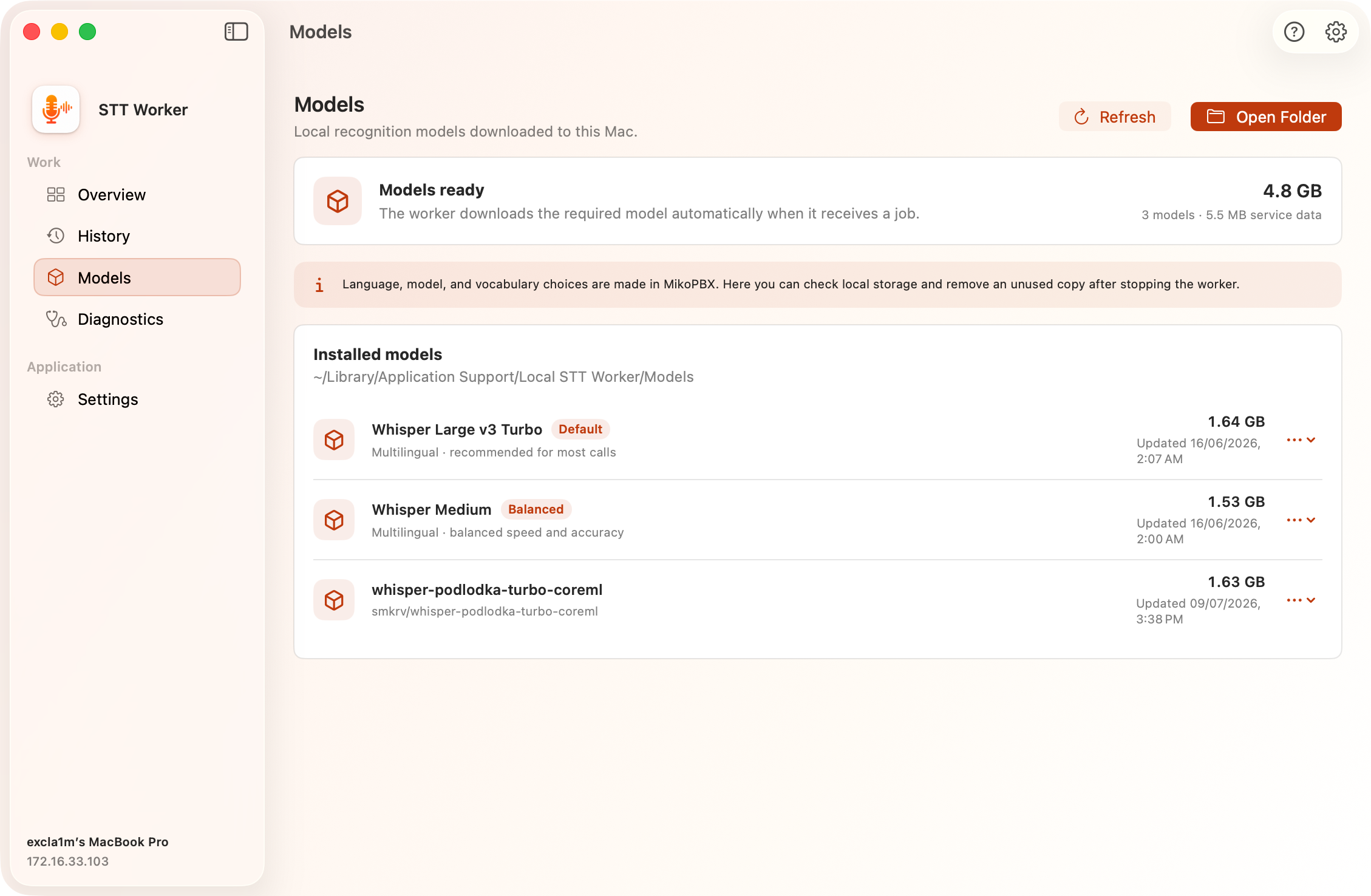
The model for new jobs is selected in MikoPBX on the **Model marketplace** tab. The worker synchronizes the selection with the PBX and automatically downloads the required files when it receives the first job that uses the model.
This section shows:
* the number of models and their total size;
* the size of service data;
* the list of locally downloaded models;
* the model storage location in Finder.
For Parakeet, this section may show two sets of files: **ASR**, which contains the Core ML recognition model, and **Tokenizer**, which is used to prepare recognition-term hints. Both sets belong to the same model.
The **Refresh** and **Open Folder** buttons rescan local storage and open it in Finder. An unused local model copy can be deleted only after the worker is stopped. If the model is needed again, it will be downloaded again.
{% hint style="info" %}
Processing with a new model takes longer the first time because the worker must download it and prepare its cache. Keep the internet connection available until the download completes.
{% endhint %}
Models in Local STT Worker
### Diagnostics section
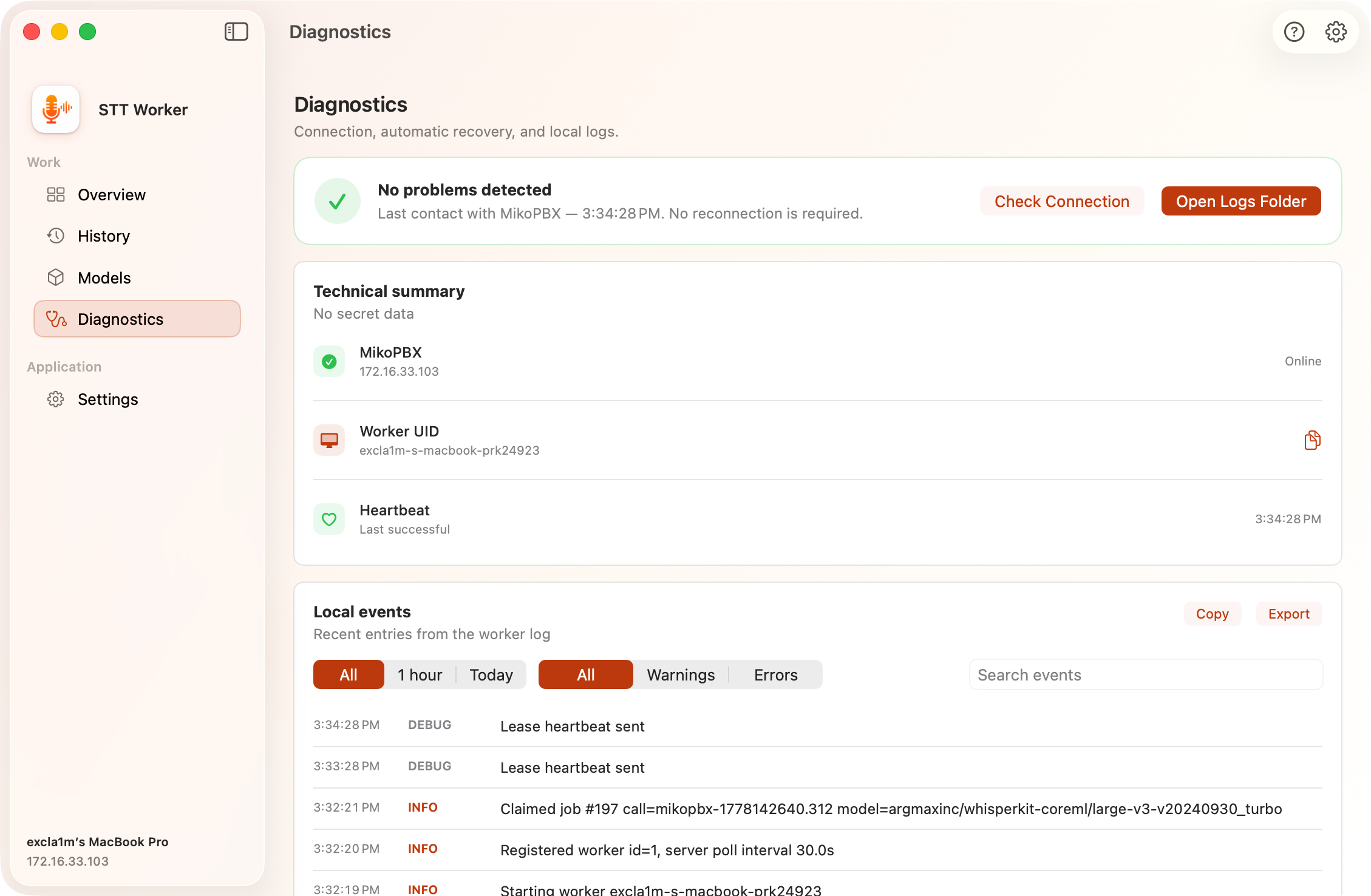
Diagnostics combines connection status, automatic recovery information, and the local log.
At the top, you can see:
* the overall health assessment;
* the **Check Connection** button;
* the **Open Logs Folder** button.
The technical summary shows the MikoPBX address, connection status, UID, and time of the last successful heartbeat. Copy the UID to match this Mac with its entry in the PBX worker table.
Local events can be filtered by time (**All**, **1 hour**, **Today**) and level (**All**, **Warnings**, **Errors**), searched, copied, or exported. The page displays the latest 250 matching events.
Diagnostics in Local STT Worker
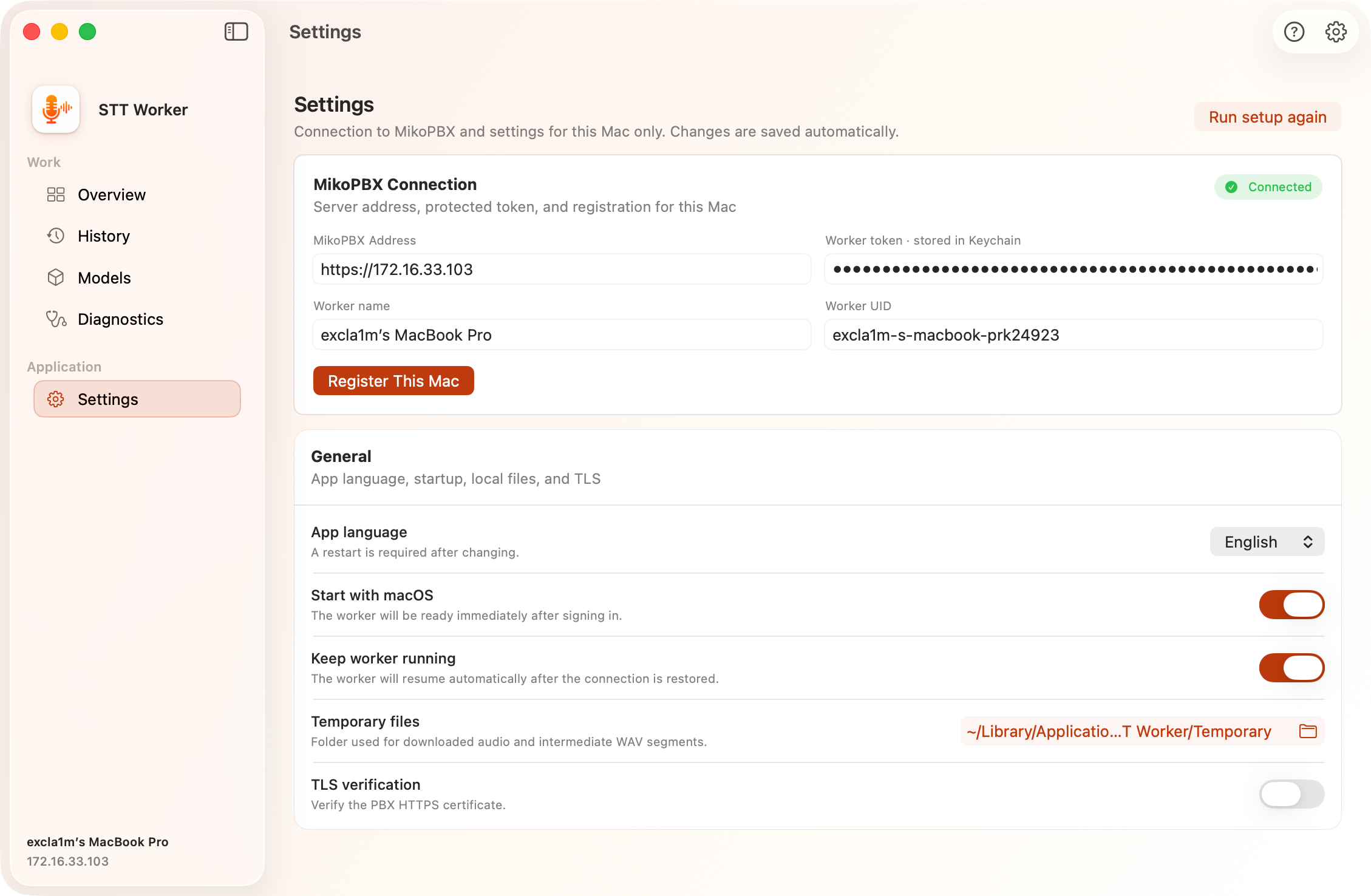
### Settings section
#### MikoPBX Connection
| Field | Purpose |
| ------------------- | ---------------------------------------------------- |
| **MikoPBX Address** | Address of the PBX used by the worker. |
| **Worker token** | Restricted module token stored in macOS Keychain. |
| **Worker name** | Recognizable Mac name shown in the PBX worker table. |
| **Worker UID** | Stable technical identifier for this Mac. |
The **Register This Mac** button checks the connection and creates or updates the registration.
#### General settings
| Setting | Purpose |
| ----------------------- | ------------------------------------------------------------------------------------------------------- |
| **App language** | English, Russian, or the system language. A restart is required to apply a change. |
| **Start with macOS** | Start the application after the user signs in. |
| **Keep worker running** | Preserve the intent to run and recover automatically after a network outage, sleep, or temporary error. |
| **Temporary files** | Folder containing downloaded recordings and intermediate WAV segments. |
| **TLS verification** | Verify the MikoPBX HTTPS certificate. |
| **Custom CA** | Optional PEM/CRT/CER file for a private certificate authority. |
The **Run setup again** button opens the onboarding wizard again.
Settings in Local STT Worker
### Menu bar status
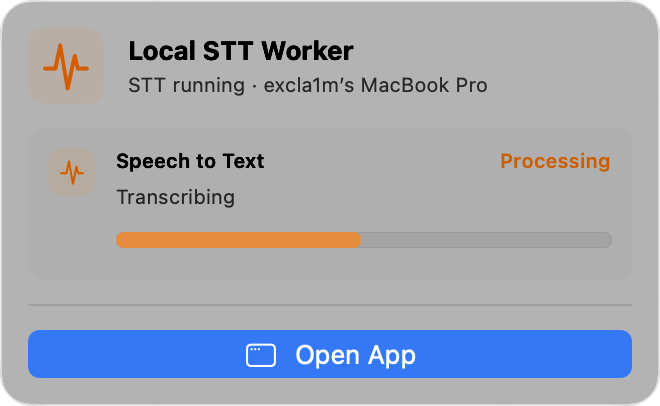
The Local STT Worker menu bar icon shows whether Speech to Text is running, a transcription is in progress, or attention is required. The menu contains the status, current stage or last-contact time, and the **Open App** button.
Worker status in the menu bar
### Local data and security
| Data | Location |
| ---------------- | ---------------------------------------------------------- |
| Models | `~/Library/Application Support/Local STT Worker/Models` |
| Temporary files | `~/Library/Application Support/Local STT Worker/Temporary` |
| Logs | `~/Library/Logs/Local STT Worker` |
| Passwords/tokens | Keychain service `LocalSTTWorker.PBX` |
| Settings | Application UserDefaults `com.mikopbx.LocalSTTWorker` |
The worker accepts recordings only from the authorized MikoPBX and stores them in a secure temporary directory. Temporary audio files are deleted after each job completes.
For Parakeet, the worker verifies the expected model and repository, downloads components only over HTTPS, validates supporting files, and does not follow symbolic links inside model directories. Local model paths are not included in failure messages sent to the PBX.
### What is configured in MikoPBX and what is configured on the Mac
| Location | Settings |
| -------------------- | ----------------------------------------------------------------------------------------------------------------------------------------------------- |
| **MikoPBX / module** | Processing window, retention period, engine and model, job language, recognition terms, processing profile, queue, keys, transcripts, and module log. |
| **Local STT Worker** | Connection settings, Mac UID and name, worker startup and recovery, local model cache, temporary folder, TLS/CA, local history, and diagnostics. |
---
# Agent Instructions
This documentation is published with GitBook. GitBook is the documentation platform designed so that both humans and AI agents can read, navigate, and reason over technical content effectively. Learn more at gitbook.com.
## Querying This Documentation
If you need additional information that is not directly available in this page, you can query the documentation by asking a question.
Perform an HTTP GET request on the following URL with the `ask` and `goal` query parameters:
```
GET https://docs.mikopbx.com/mikopbx/english/modules/miko/module-local-speech-to-text/miko-ai-worker.md?ask=&goal=
```
`ask` is the immediate question: it should be specific, self-contained, and written in natural language.
`goal` is what the user is ultimately trying to achieve, the reason they need the answer. Sharing it helps GitBook give you a better, more relevant answer. A goal is most helpful when it describes the outcome the user wants rather than restating the question. For example, with `ask=how do I create an API token`, a goal like `automate deployments from our CI pipeline` lets GitBook tailor the answer to that use case.
The response will contain a direct answer to the question and relevant excerpts and sources from the documentation.
Use this mechanism when the answer is not explicitly present in the current page, you need clarification or additional context, or you want to retrieve related documentation sections.