> For the complete documentation index, see [llms.txt](https://docs.mikopbx.com/mikopbx/llms.txt). Markdown versions of documentation pages are available by appending `.md` to page URLs; this page is available as [Markdown](https://docs.mikopbx.com/mikopbx/english/modules/miko/module-phrase-studio.md).
# Phrase Studio (TTS)
Offline Piper-powered TTS studio for MikoPBX: generate IVR/voicemail phrases on the PBX, reuse them from a searchable history, and one-click drop the result into the standard Sound Files editor.
The **Phrase Studio (TTS)** module is an offline voice-phrase generator for MikoPBX, powered by the [Piper TTS](https://github.com/rhasspy/piper) neural engine. All synthesis happens on the PBX itself — no caller text leaves the server, there are no per-character cloud charges, and there is no GDPR exposure for prompts and IVR scripts.
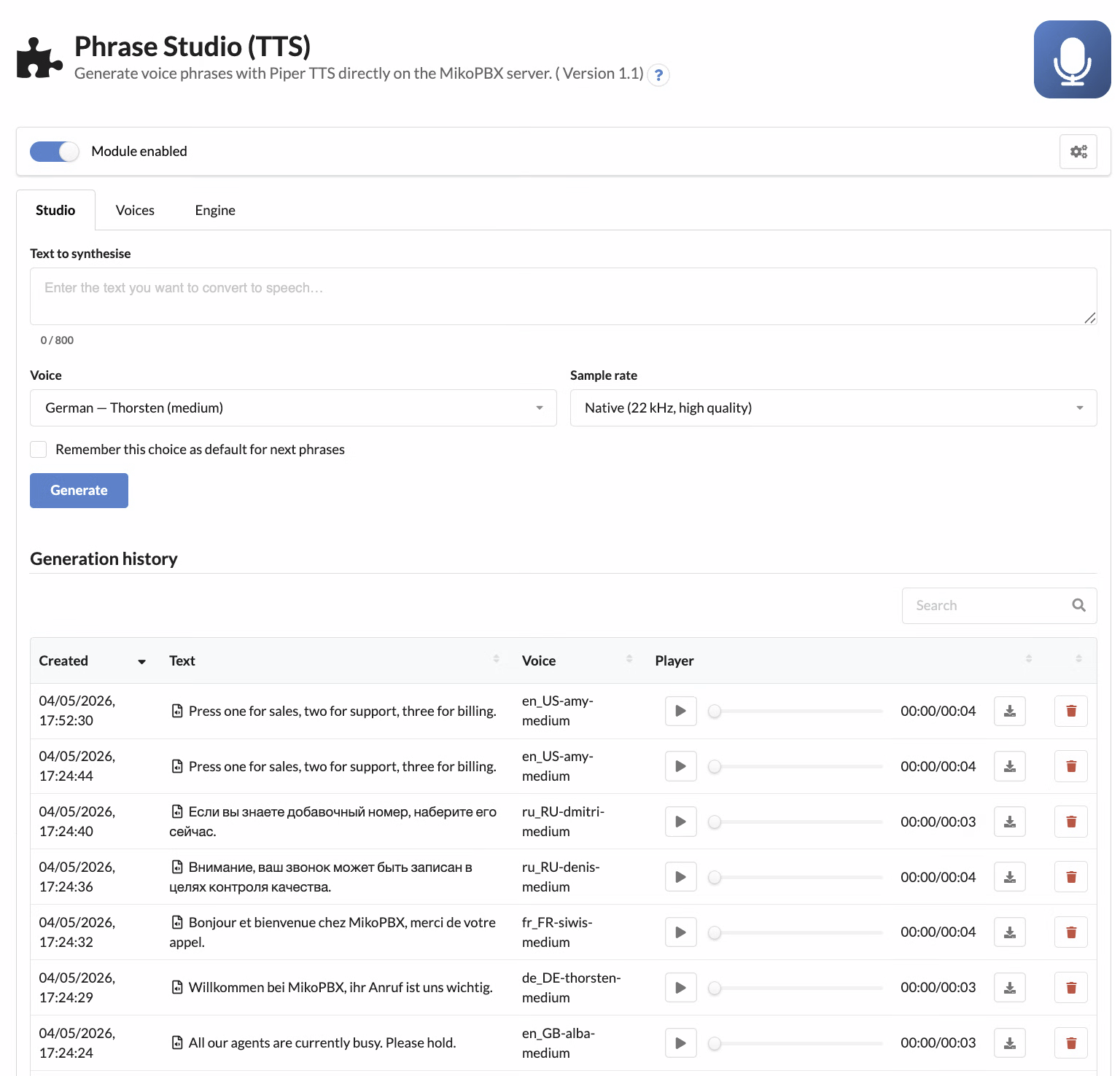
Phrase Studio main page
## What it does
* Inline TTS studio with text editor, voice picker, sample-rate switch and live audio preview.
* Searchable generation history — click any row to repopulate the form with that phrase's text + voice and re-record it instantly.
* 25+ languages out of the box: English (multiple regional accents), Russian, German, French, Italian, Spanish, Polish, Portuguese, Czech, Ukrainian, Chinese and more.
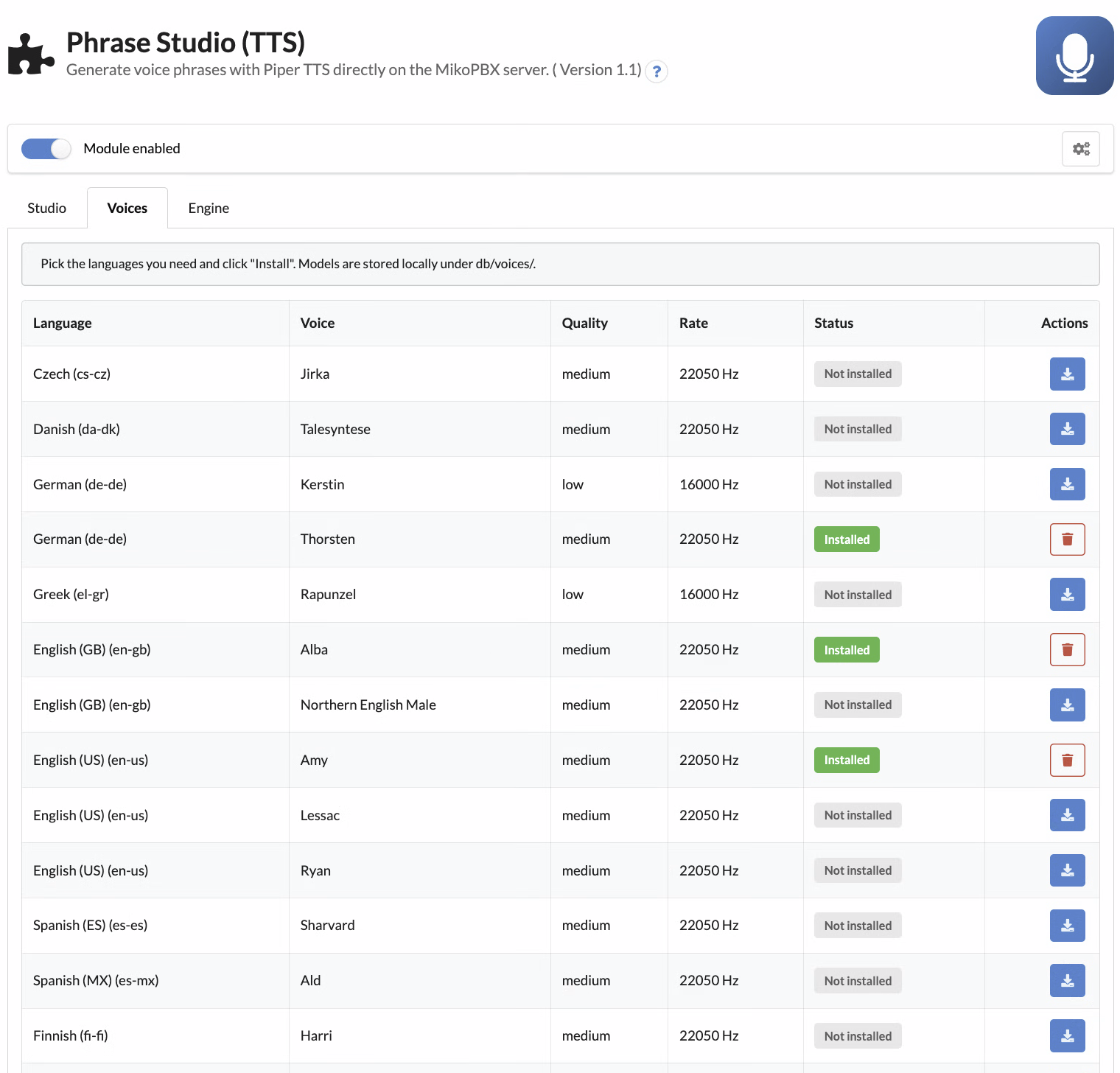
* Per-voice install / uninstall — pull only the languages you actually use; the rest stays off disk.
* High-quality preview MP3 (22 kHz / 128 kbit/s) — no more "talking through a bucket" sound that the default 8 kHz telephony pipeline produces.
* Filenames are auto-derived from the phrase text via Cyrillic→Latin transliteration (e.g. *"Здравствуйте, спасибо за ваш звонок"* → `Zdravstvujte_spasibo_za_vas_zvonok.wav`).
* REST API v3 for scripted IVR build pipelines.
## Bootstrapping the engine and voices
The module ships empty: the Piper binary and the voice models are downloaded on demand. The first two steps are normally automatic — **enabling the module triggers a background download of the Piper engine and a refresh of the voice catalogue** — so in the common case you can jump straight to step 2:
1. *(Auto on enable, manual fallback)* Open the **Engine** tab. The architecture-matched Piper binary (≈ 25 MB, statically linked) is downloaded and unpacked into `db/piper/` automatically when the module is enabled. If the auto-bootstrap was skipped (no internet during enable, air-gapped install) or you want to re-pull the binary after a release, press **Install engine** — the same button is also exposed as **Update engine** and forces a re-download even if a working binary is already on disk.
2. Switch to the **Voices** tab, select the languages you need and press **Install** next to each one. Models are 30–60 MB each and live in `db/voices/`. The download runs asynchronously in a detached background process: the row immediately shows an *Installing…* spinner and flips to *Installed* (or *Failed* with a diagnostic message) once the download completes. You can navigate away or reload the page — progress is tracked on the database row, not in the browser, so the spinner picks up where it left off.
3. Go back to the **Studio** tab and start synthesizing.
Voice catalogue with one-click install / uninstall
## Inline use in the Sound Files editor
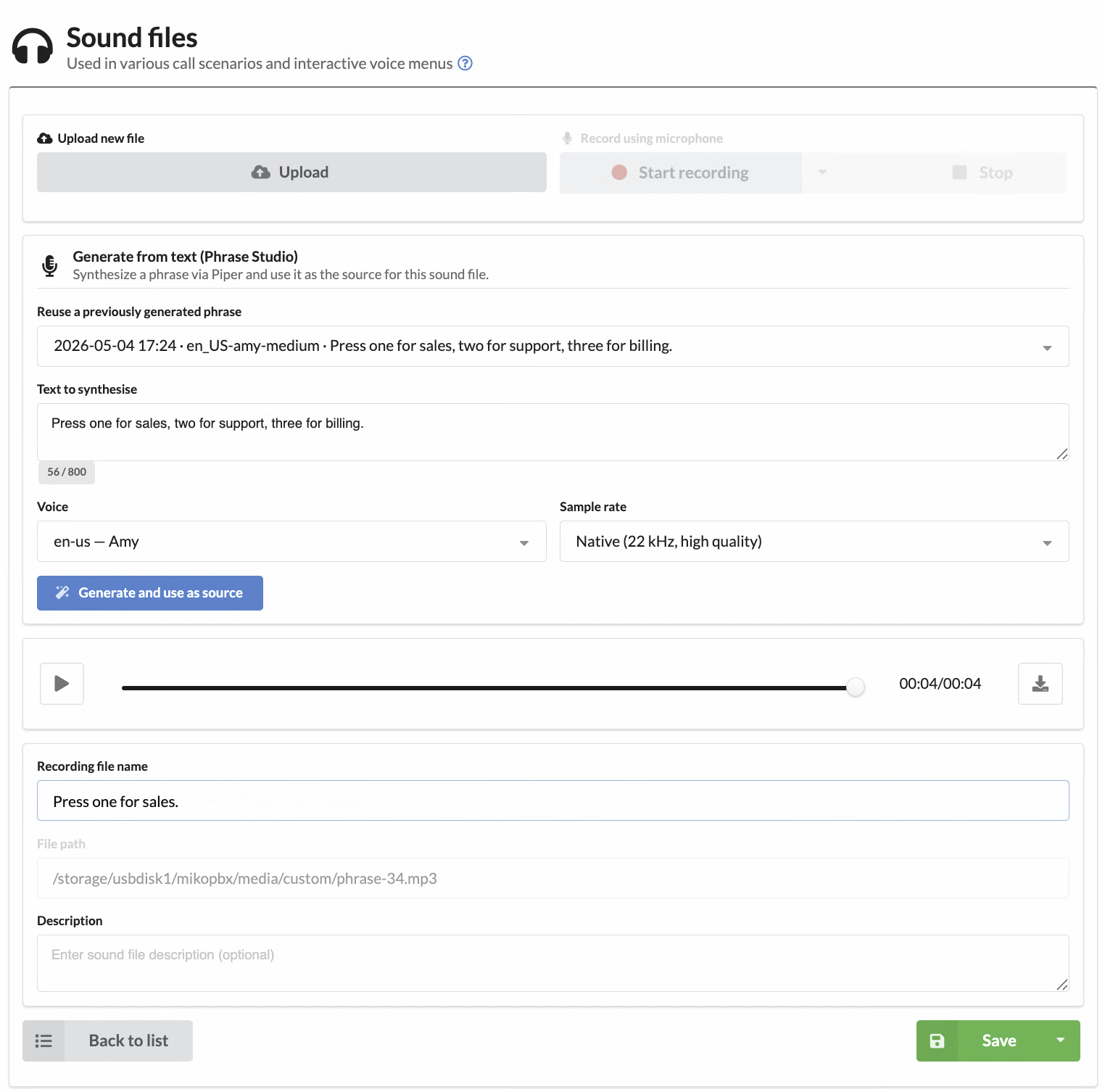
When you create or edit a custom sound file in MikoPBX, a **"Generate from text (Phrase Studio)"** segment appears right inside the standard form:
* **Reuse a previously generated phrase** — pick an entry from the history dropdown; the source file in the form is replaced immediately and the player starts playing the new audio.
* **Generate and use as source** — type new text, pick a voice and rate, and the result automatically becomes the source file of the current sound entry.
* The high-quality MP3 plays in the standard MikoPBX player; the Asterisk-format derivatives (`ulaw`, `alaw`, `gsm`, `g722`, `sln`) are produced at the rates Asterisk requires for telephony playback.
The TTS block embedded in the standard Sound Files editor
The block is intentionally hidden for **MOH** (music-on-hold) entries — Phrase Studio is for speech, not background music.
## Quality knobs
* **Sample rate** — *Native (22 kHz)* for studio-quality preview and HD codecs (g.722, opus); *Telephony (8 kHz mono)* for legacy g.711 trunks.
* **Maximum text length** — defaults to 800 characters (≈ 60 seconds of speech). Longer phrases are rejected to protect the worker.
* **Cache size limit** — defaults to 500 phrases; the oldest entries are pruned automatically.
## REST API v3
All endpoints are auto-discovered via PHP 8 attributes and live under `/pbxcore/api/v3/module-phrase-studio/`. Authentication: localhost or Bearer token.
| Method | Endpoint | Description |
| ------ | --------------------------- | -------------------------------------------------------------------------------------------------------------------------------------------------------------------------- |
| GET | `engine` | Engine status (installed, version) |
| POST | `engine:install` | Install the Piper binary. Pass `{"force":true}` in the body to force a re-download (Update flow) |
| DELETE | `engine` | Remove the Piper binary |
| GET | `voices` | Catalogue + installed flag per voice. Optional query: `language=ru-ru`, `installed_only=true` |
| POST | `voices:install` | **Async.** Queues a voice download and returns `202 Accepted` with `install_status="installing"` — clients poll `GET voices` until the row flips to `installed` / `failed` |
| DELETE | `voices/{id}` | Remove a voice model |
| GET | `phrases` | Phrase history |
| POST | `phrases` | Generate (or return cached) phrase |
| GET | `phrases/{id}:download` | Stream the WAV (HEAD = duration probe) |
| POST | `phrases/{id}:promoteToTmp` | Stage WAV for Sound Files import |
| DELETE | `phrases/{id}` | Remove a single history entry |
Voice rows returned by `GET voices` carry the async-install status fields the UI uses to drive its loader: `install_status` (`""` / `"installing"` / `"installed"` / `"failed"`) and `install_error` (set only when status is `failed`). A row stuck in `installing` for over five minutes is auto-flipped to `failed` with a synthetic timeout message, so a polling loop will eventually converge without manual cleanup.
Example — generate a phrase from a script:
```bash
curl -X POST -H "Authorization: Bearer $TOKEN" \
-H "Content-Type: application/json" \
-d '{"text":"Welcome to MikoPBX","voice_id":"en_US-amy-medium","sample_rate":"telephony"}' \
https://pbx.example.com/pbxcore/api/v3/module-phrase-studio/phrases
```
Example — install a voice asynchronously and poll until ready:
```bash
curl -X POST -H "Authorization: Bearer $TOKEN" \
-H "Content-Type: application/json" \
-d '{"voice_id":"en_US-amy-medium"}' \
https://pbx.example.com/pbxcore/api/v3/module-phrase-studio/voices:install
# → 202 {"voice_id":"en_US-amy-medium","install_status":"installing","queued":true,...}
curl -H "Authorization: Bearer $TOKEN" \
"https://pbx.example.com/pbxcore/api/v3/module-phrase-studio/voices?installed_only=true"
# → poll until the matching row reports install_status="installed"
```
## Requirements
* MikoPBX **2026.1.223+**
* PHP **8.4** on the module side
* ≈ 50 MB free disk for the engine plus a similar amount per installed voice
* Outbound HTTPS access at first install (engine + voice download)
{% hint style="info" %}
Module source code and issue tracker live on GitHub: [mikopbx/ModulePhraseStudio](https://github.com/mikopbx/ModulePhraseStudio). Share ideas and pull requests in our developer chat: [@mikopbx\_dev](https://t.me/mikopbx_dev).
{% endhint %}
---
# Agent Instructions
This documentation is published with GitBook. GitBook is the documentation platform designed so that both humans and AI agents can read, navigate, and reason over technical content effectively. Learn more at gitbook.com.
## Querying This Documentation
If you need additional information that is not directly available in this page, you can query the documentation by asking a question.
Perform an HTTP GET request on the following URL with the `ask` and `goal` query parameters:
```
GET https://docs.mikopbx.com/mikopbx/english/modules/miko/module-phrase-studio.md?ask=&goal=
```
`ask` is the immediate question: it should be specific, self-contained, and written in natural language.
`goal` is what the user is ultimately trying to achieve, the reason they need the answer. Sharing it helps GitBook give you a better, more relevant answer. A goal is most helpful when it describes the outcome the user wants rather than restating the question. For example, with `ask=how do I create an API token`, a goal like `automate deployments from our CI pipeline` lets GitBook tailor the answer to that use case.
The response will contain a direct answer to the question and relevant excerpts and sources from the documentation.
Use this mechanism when the answer is not explicitly present in the current page, you need clarification or additional context, or you want to retrieve related documentation sections.