> For the complete documentation index, see [llms.txt](https://docs.mikopbx.com/mikopbx/llms.txt). Markdown versions of documentation pages are available by appending `.md` to page URLs; this page is available as [Markdown](https://docs.mikopbx.com/mikopbx/faq/cases/call-the-company-from-your-mobile-and-dial-an-extension-to-call-a-third-party-company.md).

# Позвонить в компанию с мобильного и набрав добавочный позвонить сторонней компании

Такой функционал удобен для мобильных сотрудников. Когда важно, чтобы разговор был записан и зафиксирован на АТС в истории звонков. Когда нет возможности использовать софтфон / или «IP-SIM».

1. Добавьте новое приложение dialplan (см. [**Приложения диалпланов**](/mikopbx/manual/modules/dialplan-applications.md))

<figure><img src="/files/XGesrOhP51R4yHRpvDj1" alt=""><figcaption><p>Новое приложение диалпланов</p></figcaption></figure>

2. Назначьте внутренний номер, к примеру **2200109**

<figure><img src="/files/EnGxWbQmkyAuzzGlbmNH" alt=""><figcaption><p>Номер диалплана</p></figcaption></figure>

3. Вставьте код во вкладку "**Программный код**":

```php
<?php

namespace MikoPBX\Core\System;

require_once('Globals.php');

use MikoPBX\Common\Models\ExternalPhones;
use MikoPBX\Core\Asterisk\AGI;
use Phalcon\Mvc\Model\Resultset;

$agi    = new AGI();

$number = substr($agi->request['agi_callerid'],-10);
if(strlen($number) < 7){
    $agi->noop('Count < 7');
    // Проверка на длину номера.
    exit(0);
}
$outPhone = ExternalPhones::findFirst([
  'conditions' => 'dialstring LIKE :number:',
  'bind'       => [
      'number' => "%$number",
  ],
  'hydration' => Resultset::HYDRATE_ARRAYS,
]);

if(count($outPhone) !== 1){
    $agi->noop('ExternalPhones not found '.$number);
    // Проверка на принадлежность номера телефона сотруднику компании.
    exit(0);
}

$agi->set_variable('AGIEXITONHANGUP', 'yes');
$agi->set_variable('AGISIGHUP', 'yes');
$agi->set_variable('__ENDCALLONANSWER', 'yes');
$agi->exec('Ringing', '');
$agi->Answer();

$result      = $agi->getData('vm-enter-num-to-call', 3000, 11);
$selectednum = $result['result']??'';
if(!empty($selectednum)){
    // Все ок. Завершаем вызов.
    $agi->set_variable('__pt1c_UNIQUEID', '');
    $agi->exec(
        'Dial',
        "Local/{$selectednum}@all_peers/n,300," . 'TtekKHhU(dial_answer)b(dial_create_chan,s,1)'
    );
}else{
    $agi->noop('selectednum is empty');
}
```

<figure><img src="/files/iCZvNLmWwIqD7ChCkXa8" alt=""><figcaption><p>Код для создаваемого диалплана</p></figcaption></figure>

4. В адресной строке браузера скопируйте ID приложения. Он будет иметь вид «**DIALPLAN-APP-6A9902C631C5E7B5AC8F501C559FD678**»

<figure><img src="/files/gdLvF28wI2tn6q5T3fNH" alt=""><figcaption><p>ID диалплана</p></figcaption></figure>

5. Перейдите в раздел "**Кастомизация системных файлов**"

<figure><img src="/files/vijEVOA1rNRbdd8BCwSl" alt=""><figcaption><p>Раздел "Кастомизация системных файлов"</p></figcaption></figure>

6. Откройте для редактирования файл "**extensions.conf**"

<figure><img src="/files/VUuCfVqNcFcxZzAVl1oF" alt=""><figcaption><p>Конфигурационный файл "<strong>extensions.conf</strong>"</p></figcaption></figure>

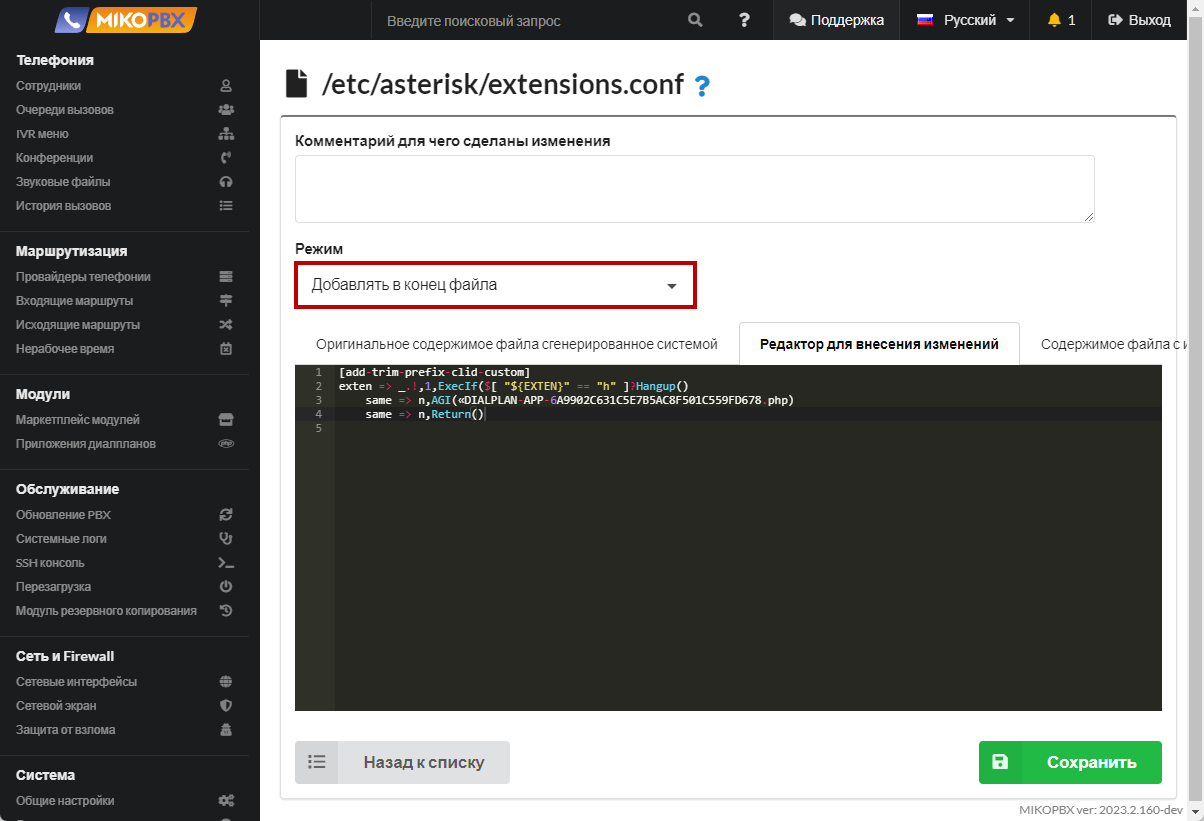
7. Вставьте в конец файла следующий код:

```php
[add-trim-prefix-clid-custom]
exten => _.!,1,ExecIf($[ "${EXTEN}" == "h" ]?Hangup()
    same => n,AGI(«DIALPLAN-APP-6A9902C631C5E7B5AC8F501C559FD678.php)
    same => n,Return()
```

<figure><img src="/files/XqnsiacMG6y1ThfWqlUi" alt=""><figcaption><p>Код для extensions.conf</p></figcaption></figure>

{% hint style="warning" %}
тут «DIALPLAN-APP-6A9902C631C5E7B5AC8F501C559FD678» - это ID приложения.
{% endhint %}

### Важные моменты <a href="#vazhnye_momenty" id="vazhnye_momenty"></a>

1. Приложение будет выполнено для **всех** входящих вызовов
2. Ввести добавочный будет возможно лишь в том случае, если номер телефона звонящего заполнен в карточке сотрудника, то есть номер должен принадлежать сотруднику. Это сделано для безопасности
3. **Скрипт не является завершенным продуктом**, но открыт для кастомизации


---

# Agent Instructions
This documentation is published with GitBook. GitBook is the documentation platform designed so that both humans and AI agents can read, navigate, and reason over technical content effectively. Learn more at gitbook.com.

## Querying This Documentation
If you need additional information that is not directly available in this page, you can query the documentation dynamically by asking a question.

Perform an HTTP GET request on the current page URL with the `ask` query parameter, and the optional `goal` query parameter:

```
GET https://docs.mikopbx.com/mikopbx/faq/cases/call-the-company-from-your-mobile-and-dial-an-extension-to-call-a-third-party-company.md?ask=<question>&goal=<endgoal>
```

`ask` is the immediate question: it should be specific, self-contained, and written in natural language.
`goal` is optional and describes the broader end goal you are ultimately trying to accomplish on behalf of the user. GitBook uses it to tailor the answer towards what is most useful for that goal.

The response will contain a direct answer to the question and relevant excerpts and sources from the documentation.

Use this mechanism when the answer is not explicitly present in the current page, you need clarification or additional context, or you want to retrieve related documentation sections.