# Call the company from your mobile and dial an extension to call a third-party company

This functionality is convenient for mobile employees. When it is important that the conversation is recorded and recorded on the PBX in the call history. When it is not possible to use a softphone / or "IP-SIM".

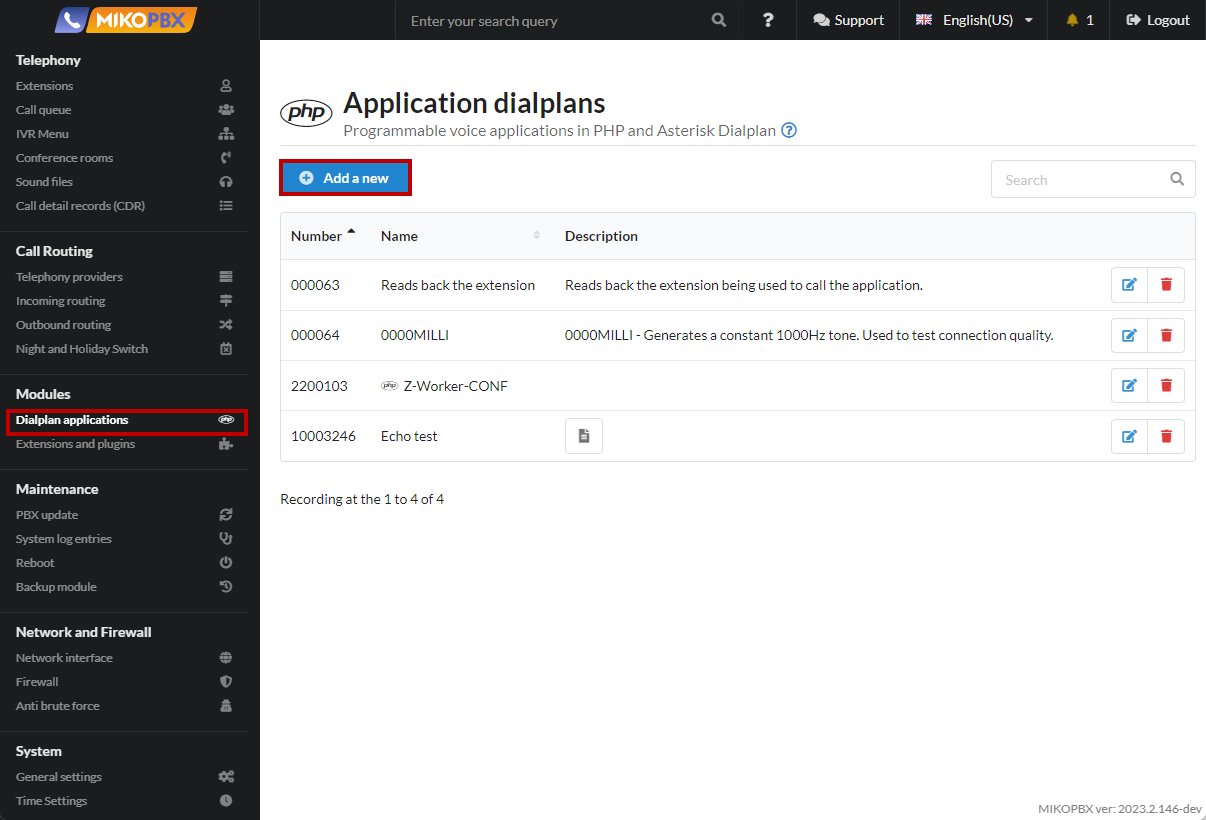
1. Add a new dialplan application (see [Dialplan Applications](/mikopbx/english/manual/modules/dialplan-applications.md))

<figure><img src="/files/uaGJWT3locoDlr3MxQa6" alt=""><figcaption><p>Dialplan applications section</p></figcaption></figure>

2. Assign an internal number, for example **2200109**

<figure><img src="/files/wSFTPKHGItlHmqmzkrfd" alt=""><figcaption><p>Dialplan Number</p></figcaption></figure>

3. Paste the code into the "**Programme Code**" tab:

```php
<?php

namespace MikoPBX\Core\System;

require_once('Globals.php');

use MikoPBX\Common\Models\ExternalPhones;
use MikoPBX\Core\Asterisk\AGI;
use Phalcon\Mvc\Model\Resultset;

$agi    = new AGI();

$number = substr($agi->request['agi_callerid'],-10);
if(strlen($number) < 7){
    $agi->noop('Count < 7');
    //Checking for the length of the number.
    exit(0);
}
$outPhone = ExternalPhones::findFirst([
  'conditions' => 'dialstring LIKE :number:',
  'bind'       => [
      'number' => "%$number",
  ],
  'hydration' => Resultset::HYDRATE_ARRAYS,
]);

if(count($outPhone) !== 1){
    $agi->noop('ExternalPhones not found '.$number);
    // Checking whether the phone number belongs to an employee of the company.
    exit(0);
}

$agi->set_variable('AGIEXITONHANGUP', 'yes');
$agi->set_variable('AGISIGHUP', 'yes');
$agi->set_variable('__ENDCALLONANSWER', 'yes');
$agi->exec('Ringing', '');
$agi->Answer();

$result      = $agi->getData('vm-enter-num-to-call', 3000, 11);
$selectednum = $result['result']??'';
if(!empty($selectednum)){
    // Everything is OK. Ending the call.
    $agi->set_variable('__pt1c_UNIQUEID', '');
    $agi->exec(
        'Dial',
        "Local/{$selectednum}@all_peers/n,300," . 'TtekKHhU(dial_answer)b(dial_create_chan,s,1)'
    );
}else{
    $agi->noop('selectednum is empty');
}
```

<figure><img src="/files/CMzYk5lOpXfAj065SJTB" alt=""><figcaption><p>Code for dialplan</p></figcaption></figure>

4. In the browser's address bar, copy the application ID. It will look like "**DIALPLAN-APP-6A9902C631C5E7B5AC8F501C559FD678**"

<figure><img src="/files/l1sZVpg2JijxUe3cuIPq" alt=""><figcaption><p>Dialplan ID</p></figcaption></figure>

5. Go to the "**System file customization**" section

<figure><img src="/files/tYsBgqXvD9DV5euOc4N0" alt=""><figcaption><p>System file customixation section</p></figcaption></figure>

6. Open the file "**extensions.conf**" for editing

<figure><img src="/files/R61HVwQh4xX75UmmNNdE" alt=""><figcaption><p>"extensions.conf" file</p></figcaption></figure>

7. Paste the following code at the end of the file:

```php
[add-trim-prefix-clid-custom]
exten => _.!,1,ExecIf($[ "${EXTEN}" == "h" ]?Hangup()
    same => n,AGI(«DIALPLAN-APP-6A9902C631C5E7B5AC8F501C559FD678.php)
    same => n,Return()
```

<figure><img src="/files/NN9LMvcW7rsqZelfexMU" alt=""><figcaption><p>code for extensions.conf</p></figcaption></figure>

{% hint style="info" %}
here "**DIALPLAN-APP-6A9902C631C5E7B5AC8F501C559FD678**" is the application ID.
{% endhint %}

#### Important points

1. The application will be executed for **all** incoming calls
2. It will be possible to enter an extension only if the caller's phone number is filled in the employee card, that is, the number must belong to the employee. This is done for security.
3. The script is **not a complete product**, but is open for customization


---

# Agent Instructions: Querying This Documentation

If you need additional information that is not directly available in this page, you can query the documentation dynamically by asking a question.

Perform an HTTP GET request on the current page URL with the `ask` query parameter:

```
GET https://docs.mikopbx.com/mikopbx/english/faq/cases/call-the-company-from-your-mobile-and-dial-an-extension-to-call-a-third-party-company.md?ask=<question>
```

The question should be specific, self-contained, and written in natural language.
The response will contain a direct answer to the question and relevant excerpts and sources from the documentation.

Use this mechanism when the answer is not explicitly present in the current page, you need clarification or additional context, or you want to retrieve related documentation sections.
